Add Processing Fees to Paid Classes in MOTORS
MOTORS includes an optional feature that allows schools to automatically add processing fees to all paid classes.
When enabled, a Processing Fee line item will be added to paid class registrations during checkout. The fee can be configured as a percentage, a flat dollar amount, or a combination of both.
How to Add a Processing Fee
To add a processing fee to all paid classes:
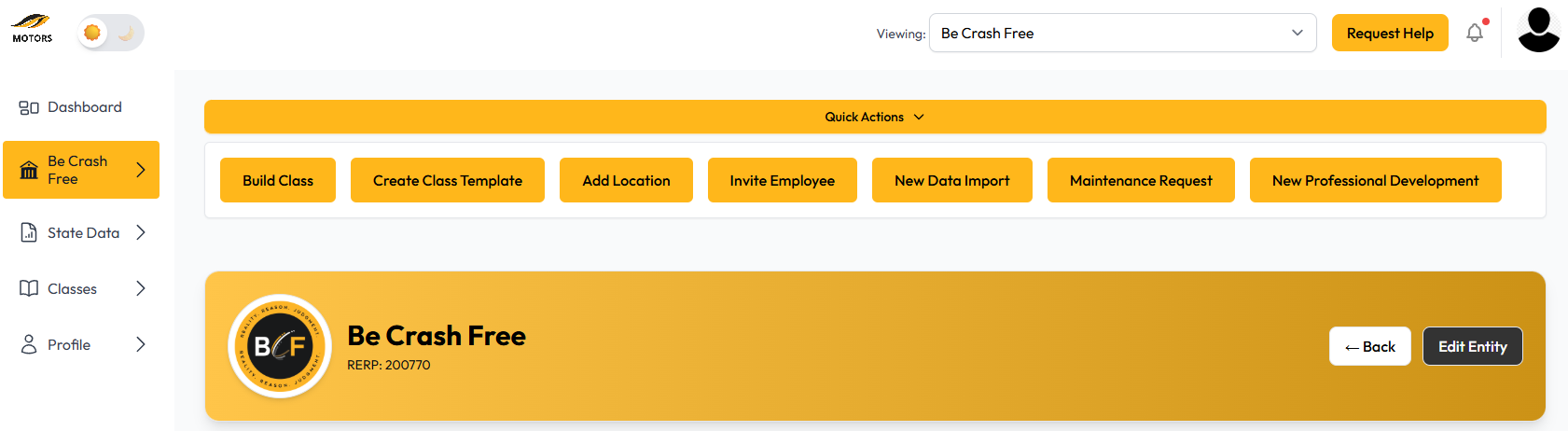
In the left-hand navigation, click the name of your school.
Click Edit Entity.
Scroll to the bottom of the page.
Locate the fields that control processing fees.
Enter a value in one or both processing fee fields.
Save your changes.
Processing Fee Options
Processing fees can be configured using either or both of the following options:
Percentage-based fee
Adds a percentage of the course fee.Flat fee
Adds a fixed dollar amount to each paid class registration.
Example
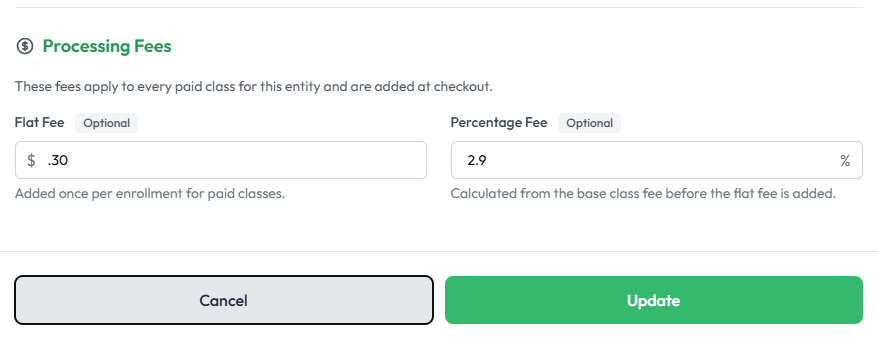
If you enter:
2.9% as the percentage-based fee
$0.30 as the flat fee
MOTORS will automatically add a Processing Fee line item to all paid classes.
For example, if a course costs $100.00, the processing fee would be:
2.9% of $100.00 + $0.30 = $3.20
The registrant would see a separate Processing Fee line item during checkout.
Notes
Processing fees apply only to paid classes.
Free classes will not receive a processing fee.
If both fee fields are left blank, no processing fee will be added.
Changes to processing fee settings apply to future registrations.
Was this article helpful?
That’s Great!
Thank you for your feedback
Sorry! We couldn't be helpful
Thank you for your feedback
Feedback sent
We appreciate your effort and will try to fix the article