Overview
Cancel a class when it will no longer take place. This removes the class from the catalog and notifies enrolled students and instructors.
After cancellation, students are marked as no longer enrolled. Refunds are not automatic and must be handled separately.
Before You Cancel
Before cancelling, consider if one of these options is better:
- Reschedule the class to keep existing enrollments
- Close enrollment to stop new registrations
- Hide the class if you don’t want it visible but still plan to run it
Cancel a Class
Steps
Open the class details page
Open the available actions menu
Select Delete Class
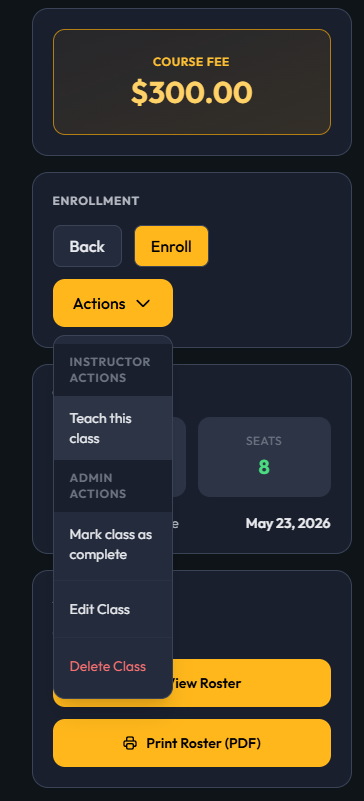
- Confirm the cancellation when prompted
What Happens After Cancellation
When a class is cancelled:
- All enrolled students are marked as cancelled
- Students and instructors are notified
- The class is removed from the catalog
- Scheduled reminders are stopped
Refunds
Important
Cancelling a class does not automatically issue refunds.
To issue refunds
- Go to the class or enrollment records
- Find each student who needs a refund
- Process refunds individually using your payment system
Tips
- Cancel classes individually when possible to ensure notifications are sent
- Double-check the class before cancelling—this action cannot be undone through the interface
- Notify students manually if needed, especially for urgent cancellations
Troubleshooting
Students did not receive a notification
- Confirm the class was cancelled individually (not as part of a bulk action)
- Check that student contact information is correct
- Contact students directly if needed
The class is still visible
- Refresh the page or check that the cancellation was confirmed
- Make sure you cancelled the correct class
I cancelled the wrong class
There is no undo option. Contact your system administrator immediately.
FAQ
Can I cancel multiple classes at once?
Yes, but notifications and enrollment updates may not be handled the same way. Cancel classes individually when possible.
Do students get refunds automatically?
No. Refunds must be processed manually.
Can I cancel a class that already started?
Yes. The class will be cancelled and students will be notified.
Can I cancel just one session of a class?
No. Cancelling applies to the entire class.
What happens to student data?
Student records are kept, but their enrollment is marked as cancelled.
Was this article helpful?
That’s Great!
Thank you for your feedback
Sorry! We couldn't be helpful
Thank you for your feedback
Feedback sent
We appreciate your effort and will try to fix the article